

It’s been about six months since Windows 11 version 25H2 dropped as a feature enablement package update on top of 24H2 & now is the time to adopt the newest release through Intune.
Hey folks, I’ve been running 25H2 in testing since mid-2025, and honestly? It feels like the stability and control bump Windows 11 needed. Better alignment with zero-trust and cloud-native workflows—no more fighting the OS as much.
If you’re still on the fence, February 2026 brought those long-awaited 25H2 Autopatch readiness & reporting upgrades in Intune 📊 (yep, even if you’re rocking classic update rings, you’re using Autopatch under the hood). Check my last post if you missed it—new readiness reports now include 25H2 insights, plus actionable remediations you can schedule ⏰right from the portal.
Before we jump into my top three picks for Intune Settings Catalog policies to test/deploy, let’s get the transparency out of the way (shoutout to the MEM group rules—adding this upfront makes it gold standard).
Technical Specs / Minimum Required Info
- Target Audience: Intune admins managing Windows 11 fleets (especially Autopilot/zero-touch setups).
- Permissions Needed: Intune Administrator (or equivalent) + Entra ID group creation rights for assignments.
- Tested In: Lab/production pilot devices on 25H2 (fully GA as of late 2025). Applies cleanly—no Insider required anymore.
- Scenarios: Works in cloud-native/Autopilot environments; great for tightening bloat, enabling recovery post-incident, and reducing helpdesk tickets on device swaps.
- Security/Impact Notes: These are CSP-backed policies—low risk, but test in a pilot group first. No sensitive data exposure beyond standard Intune telemetry.
1. App Package Deployment – Finally, Persistent Bloat Removal
This is the one I’ve been waiting for. If you’re all-in on Autopilot and zero-touch, you’re probably getting commercial Windows 11 Pro SKUs (with Enterprise upgrade during enrollment). No more custom Enterprise ISOs or LTSC headaches.
But we’ve all scripted out the Xbox app, Quick Assist (good riddance, potential hacker vector), New Outlook, Terminal, classic Notepad (is there a non-vulnerable text editor left?!), and whatever else sneaks in on the Pro image. Problem: platform scripts run once; Apps can creep back via Microsoft Updates or sometimes natural Helpdesk troubleshooting.
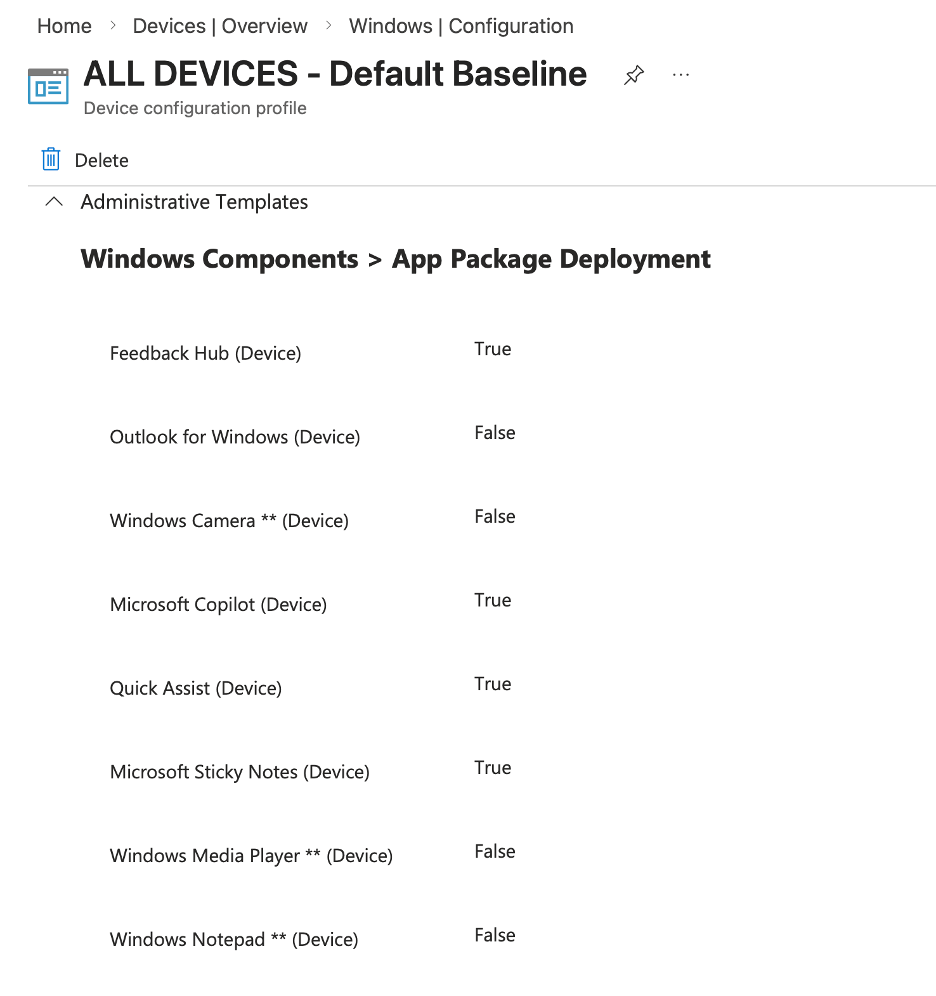
Enter App Package Deployment in Settings Catalog: Administrative Templates > Windows Components > App Package Deployment.
Set an app to true = “uninstall and keep it gone.” It’s CSP-enforced, persistent, and survives updates/reinstalls.
Head to Intune > Devices > Configuration > + Create > Windows 10 and later > Settings catalog. Search for those app toggles and lock ’em down. Game-changer for hardened builds. 🔒
2. Quick Machine Recovery (Remote Remediation) – Your Post-Crowdstrike Insurance Policy
Two words: Crowdstrike 2024. Yeah, I know—sorry for the PTSD flash. But if that taught us anything, it’s that quick, cloud-automated recovery matters. 😅
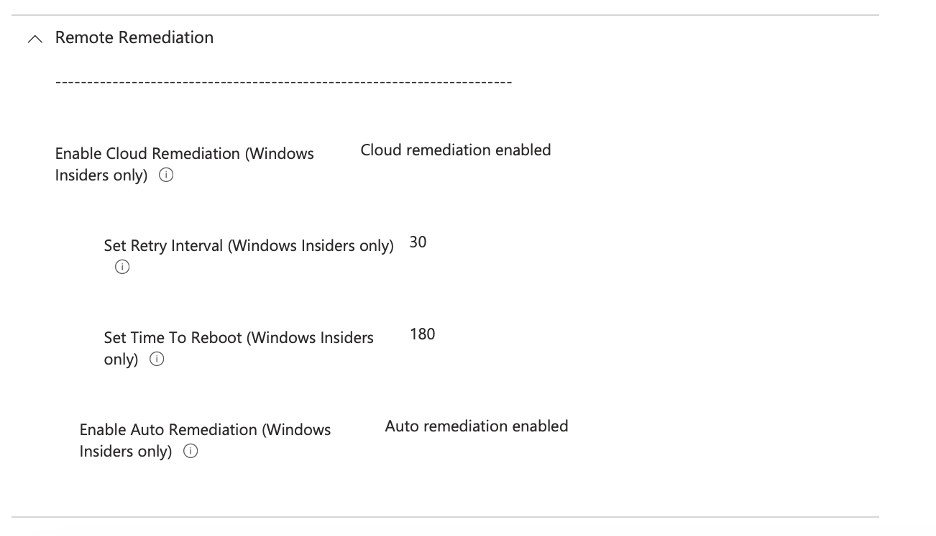
25H2 brings Quick Machine Recovery (QMR) settings—cloud restore points and remote remediation flows. Even though some docs still say “Insiders only,” I’m seeing these apply fine on GA 25H2 devices.
Build a baseline policy in Settings Catalog (search for recovery/remediation-related CSPs) and target your 25H2 test group. Implement this before you regret it. Don’t be the admin kicking yourself later.
3. Windows Backup and Restore – That “Microsoft Magic” for End Users
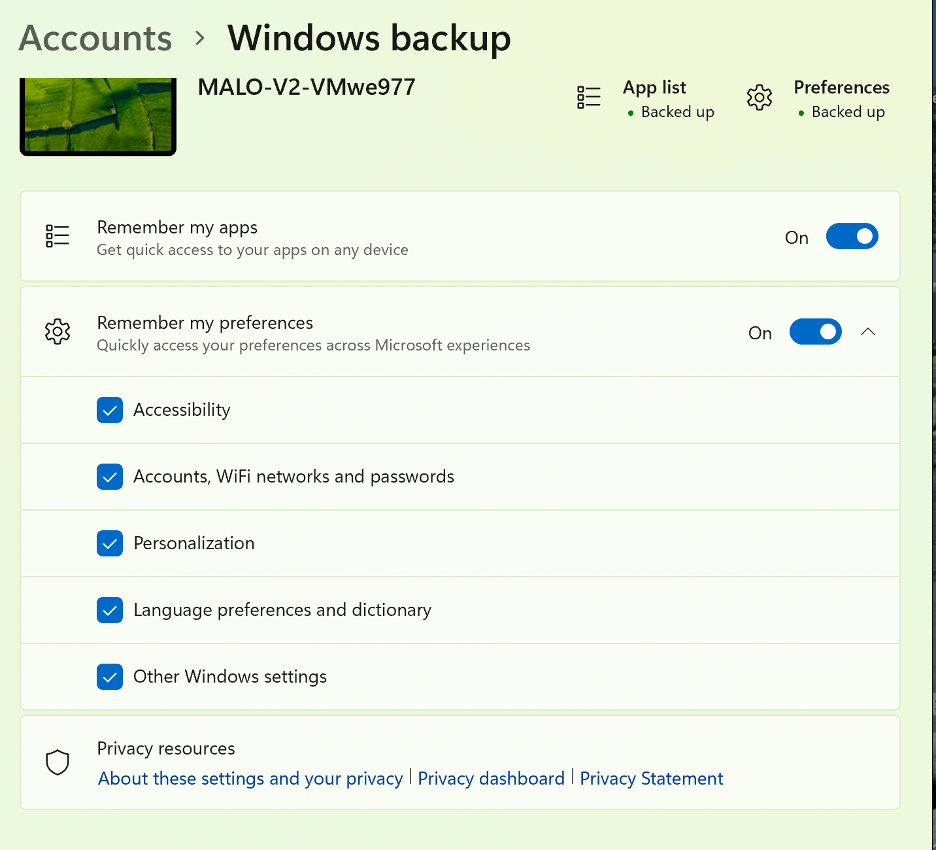
This one’s for the helpdesk heroes. Enable silent, automated OS-level settings backup/restore so when you ship a new device, users get that seamless “it just works” experience.
Think Apple AirPods following you between devices—but for Windows settings. Sign in, and boom: preferences, files (where configured), and common headaches vanish:
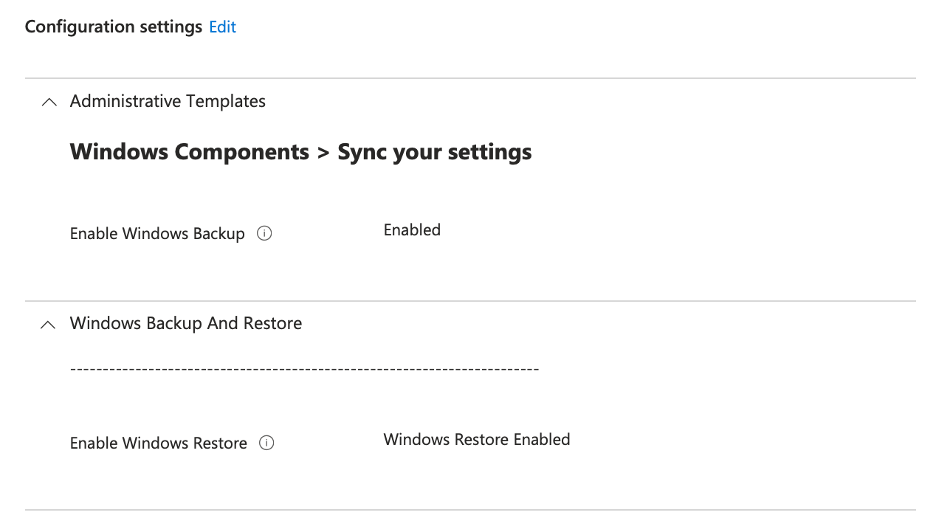
Key settings to bundle in one policy:
- EnableWindowsBackup (Sync your settings category)
- EnableWindowsRestore (Windows Backup And Restore category)
Configure together in Settings Catalog, assign to users/devices, and watch helpdesk tickets drop on refreshes.
There you have it—my three must-test 25H2 settings to squeeze more value from the upgrade. For the full 36 new policies (yep, Intune got day-zero support), check Microsoft’s post: https://techcommunity.microsoft.com/blog/intunecustomersuccess/microsoft-intune-settings-catalog-updated-to-support-new-windows-11-version-25h2/4462927
What are you waiting for? Pilot these on a small group, monitor the Autopatch readiness reports, and let’s make 25H2 work for us instead of the other way around.
Quick plug: I’m actually speaking at the upcoming Workplace Ninjas US Boston Meetup on Thursday, April 16, 2026, at the Microsoft Innovation Hub in Burlington, MA. It’s the inaugural one for the US Northeast—focused on workplace innovation, networking in the Microsoft community, and endpoint/real-world management goodness. If you’re in the area or can make the trip, come say hi, grab some insights, and let’s chat Intune in person. Check it out and register here: https://www.eventbrite.com/e/workplace-ninjas-us-boston-meetup-tickets-1982514595523
Hit me in the comments—what 25H2 settings are you prioritizing? Got any wins, learned lessons, or gotchas from testing/implementing App Package Deployment, Quick Machine Recovery, or Windows Backup and Restore? Share your experiences—love hearing how these play out in the real world beyond my lab.
Stay endpoint-strong! -Kevin

 Kevin Malinoski
Leave a comment